The Elder Scrolls V: Skyrim — это эпическая RPG с открытым миром, действие которой происходит в обширном и увлекающем фэнтезийном мире Тамриэль. Вы играете за Драконорожденного, легендарного героя, судьба которого — встретиться с возвращением древних драконов и раскрыть тайны забытой силы. Исследуйте захватывающие пейзажи — от заснеженных гор и густых лесов до шумных городов, древних руин и опасных подземелий, полных сокровищ и скрытых тайн. Создайте своего персонажа и формируйте своё приключение через бесчисленные квесты, выбирая собственный путь и решая, как взаимодействовать с окружающим миром. Освойте широкий ассортимент оружия, заклинаний и умений, развивайте свои навыки, присоединяйтесь к мощным фракциям, становитесь искусным воином, магом, ассасином или кем угодно между ними. По пути вы встретите увлекательных персонажей, сделаете важные решения, сразитесь с грозными существами и раскроете истории, которые определяют судьбу Скайрима. С его огромным миром, увлекательными квестами, запоминающейся атмосферой и свободой играть так, как вам нравится, Скайрим предлагает незабываемое фэнтезийное приключение, где каждое путешествие может быть уникальным.
Скачать The Elder Scrolls V: Skyrim
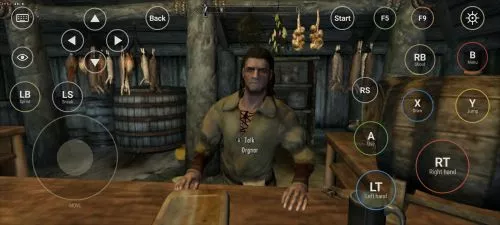
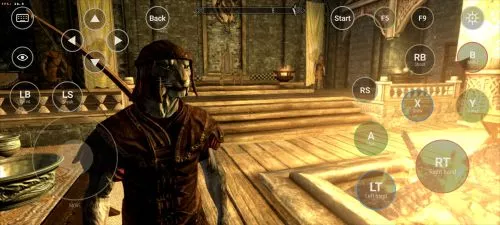
Посмотреть всеThis is an unofficial port of The Elder Scrolls V: Skyrim for Android with touchscreen controls. Enjoy the game! Installation Instructions Download and install the Skyrim Android APK. Prepare…Читать дальшеСкрыть описание
This is an unofficial port of The Elder Scrolls V: Skyrim for Android with touchscreen controls. Enjoy the game!
Installation Instructions
- Download and install the Skyrim Android APK.
- Prepare your original Skyrim (2011) PC game files, preferably Steam version 1.9.32.0.8.
- Make sure you have the following files:
TESV.exeTESV_unpacked.exed3dx9_42.dll(32-bit)binkw32.dllX3DAudio1_7.dll(32-bit)Datafolder
- Create a folder named Skyrim in your Android device’s internal storage and copy all the required files into it. Do not use the
Android/datadirectory. Keep your existing Skyrim folder and saves. Folder names and an APKVISION.ORG.txt information file no longer block launch in this fixed version. - Open the APK, tap Choose Skyrim folder, select your Skyrim folder, and grant the required permissions.
- Wait until the launcher verifies the files and displays Ready.
- For better performance, start with low graphics settings, 480p or 540p resolution, and antialiasing disabled.
- Tap Play to launch the game.
⚠️ Notes:
TESV_unpacked.exemust be prepared from a compatible original executable. The developer recommends Steamless for removing SteamStub protection.- The required DirectX DLL files can be obtained from Microsoft DirectX June 2010.
- On Android 11+, you may need to enable All files access permission.