The Elder Scrolls V: Skyrim mengajak anda untuk menjadi Dragonborn dalam pemandangan menakjubkan Tamriel, di mana nasib anda terbentang di atas pemandangan yang kolosal. Dengan sistem penciptaan watak yang kukuh, anda boleh mengubah suai wira anda untuk menjadi pejuang hebat, ahli sihir bijak, atau pembunuh yang licik. Terjun ke dalam sistem pencarian yang dinamik, pilih laluan anda sambil membina pakatan dengan fraksi berkuasa dan berjumpa dengan watak-watak yang memikat. Terlibat dalam pertempuran tanpa henti menentang naga purba dan meneroka ruang bawah tanah yang penuh dengan harta karun, sambil mengasah pelbagai mantra dan kemahiran unik. Kebebasan untuk mencipta pengembaraan anda tiada had—adakah anda akan membentuk nasib Skyrim? Mulakan perjalanan tak terlupakan anda hari ini!
Muat Turun The Elder Scrolls V: Skyrim
Lihat semuaThis is an unofficial port of The Elder Scrolls V: Skyrim for Android with touchscreen controls. Enjoy the game! Installation Instructions Download and install the Skyrim Android APK. Prepare…Baca lagiSembunyikan penerangan
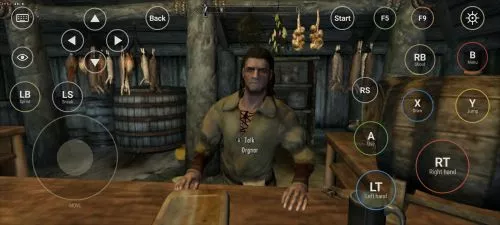
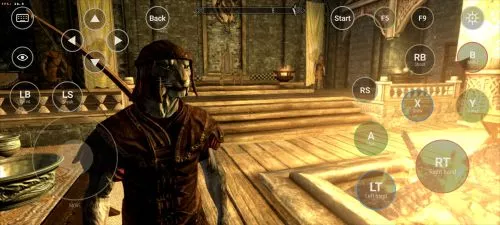
This is an unofficial port of The Elder Scrolls V: Skyrim for Android with touchscreen controls. Enjoy the game!
Installation Instructions
- Download and install the Skyrim Android APK.
- Prepare your original Skyrim (2011) PC game files, preferably Steam version 1.9.32.0.8.
- Make sure you have the following files:
TESV.exeTESV_unpacked.exed3dx9_42.dll(32-bit)binkw32.dllX3DAudio1_7.dll(32-bit)Datafolder
- Create a folder named Skyrim in your Android device’s internal storage and copy all the required files into it. Do not use the
Android/datadirectory. Keep your existing Skyrim folder and saves. Folder names and an APKVISION.ORG.txt information file no longer block launch in this fixed version. - Open the APK, tap Choose Skyrim folder, select your Skyrim folder, and grant the required permissions.
- Wait until the launcher verifies the files and displays Ready.
- For better performance, start with low graphics settings, 480p or 540p resolution, and antialiasing disabled.
- Tap Play to launch the game.
⚠️ Notes:
TESV_unpacked.exemust be prepared from a compatible original executable. The developer recommends Steamless for removing SteamStub protection.- The required DirectX DLL files can be obtained from Microsoft DirectX June 2010.
- On Android 11+, you may need to enable All files access permission.